Too many papers. Where do you start?
Search around a research question, explore related work, and choose the papers worth a closer read.
A reading list with a purpose.
Your AI research workspace
AewolFlow helps you search research papers, understand PDFs, compare findings, and draft literature reviews. Keep your original sources, quotations, and notes beside your work.
1 private project + 1 AI comparison of 2–3 arXiv papers. No card needed.
More AI research: Pro $20/mo · Academic $10/mo
From reading papers to making progress
A literature review is more than a stack of summaries. You need to find the right papers, understand what they establish, and bring the evidence into your writing. AewolFlow keeps those steps connected.
Search around a research question, explore related work, and choose the papers worth a closer read.
A reading list with a purpose.
Open the original paper, inspect supporting passages, and keep track of what the available text can and cannot establish.
Evidence you can return to.
Keep sources, observations, drafts, and open questions in a research project you can pick up again.
Your next session starts with context.
Tell AewolFlow what you want to investigate. You can refine the question in your project.
Save 2–3 arXiv papers and approve the sources for your first comparison.
Review methods, findings, and limitations, then inspect the supporting quotations.
Inside AewolFlow
Explore the actual workspace. Find relevant work, read it closely, and turn what you learn into a review you can keep developing.
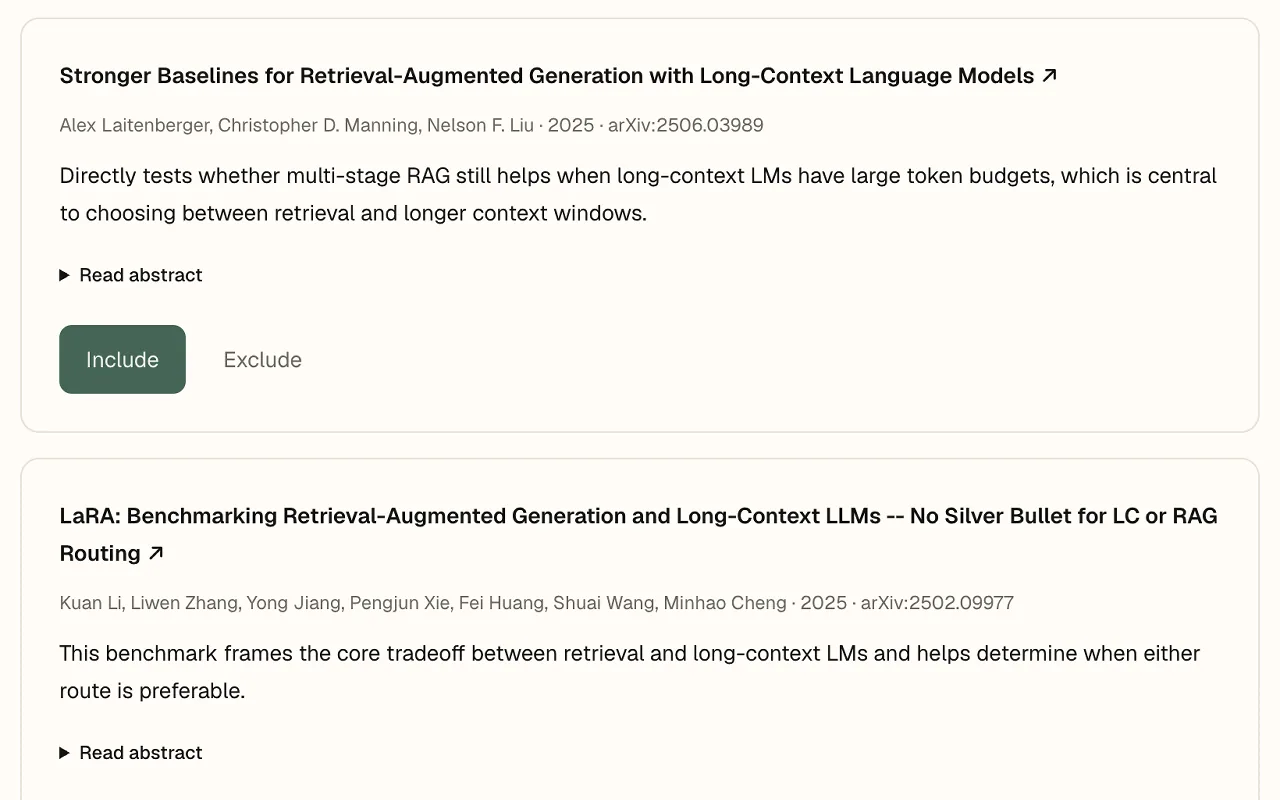
Find
Start with a topic or research question. Search arXiv, explore related work through Semantic Scholar, and decide which sources belong in your project.
Leave with a focused set of papers to investigate.
Explore discovery →Paper search · Free
Read
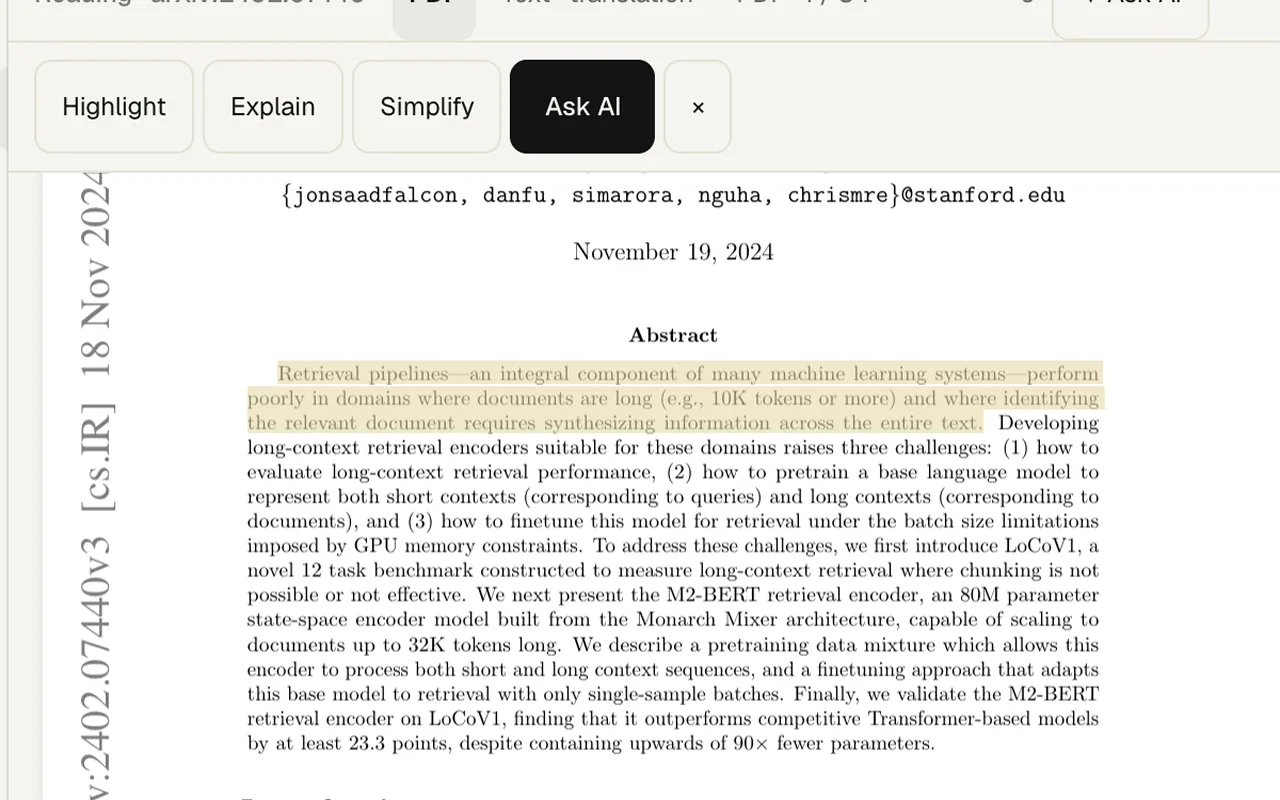
Read the original while you work through its ideas. Use AI explanations to get your bearings, then check the passages that matter in context.
Leave with notes that connect back to what you read.
Explore the paper reader →AI reading and PDF uploads · Pro
Write
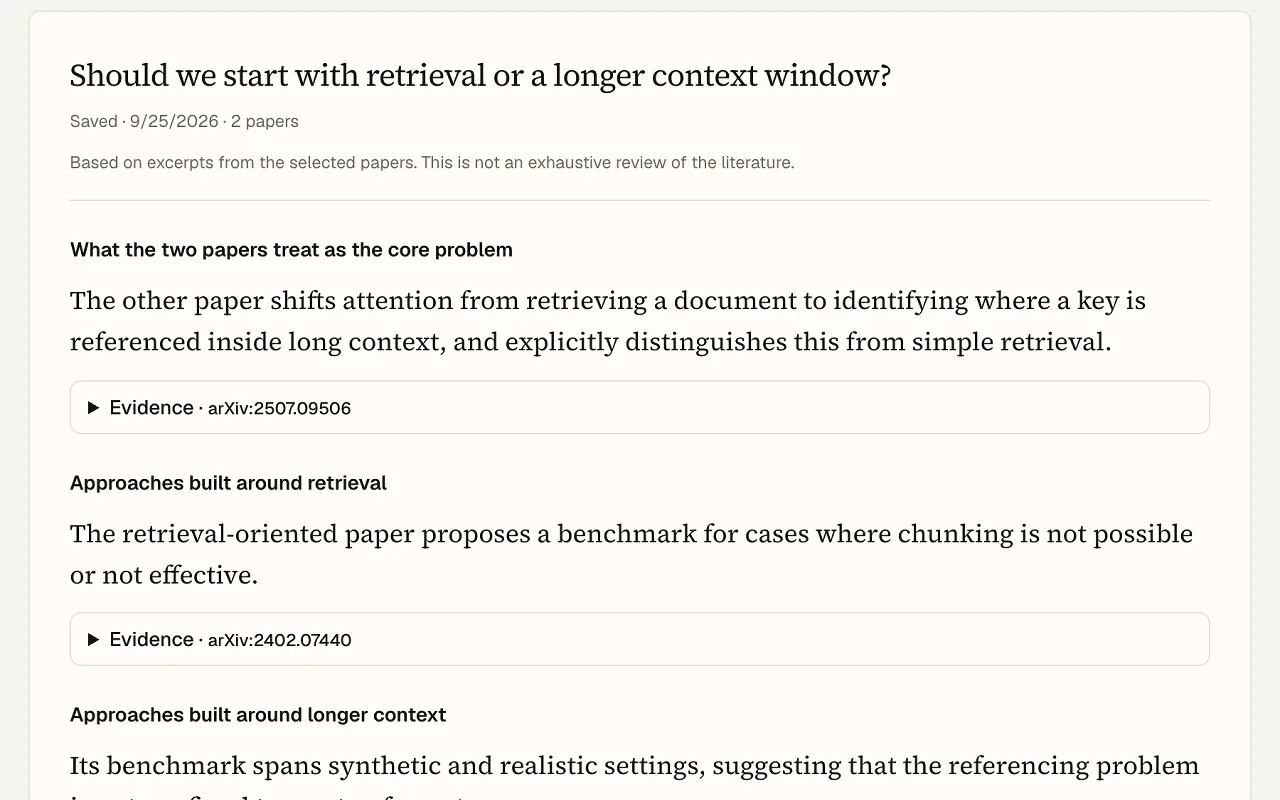
Generate a review from papers you approve, or choose evidence for a draft. Keep the result in your project so you can check it, revise it, and continue writing.
Leave with a draft you can check, edit, and build on.
Explore the workspace →AI reviews and drafting · Pro
Real product screens · One quick AI comparison is free. Other AI workflows require Pro.
Paper comparison
When several papers address your question, put their methods, findings, and limitations together. Use the comparison to decide what to read more closely and what to investigate next.
One quick comparison free
Choose 2–3 arXiv papers around your question. Inspect supporting quotations, check what the authors actually studied, and see when the retrieved text cannot establish an answer.
Start a free comparison →2–3 arXiv papers · No card required
Comparison fields depend on the available paper text. Missing evidence is shown rather than filled in.
Pro
Generate a review from a set of papers you approve. Keep the research question, source selection and saved results in the same project.
Pro
Choose evidence for your draft, follow its source links, and export your writing. Review the evidence yourself before using a claim.
One project free
Save papers, observations, decisions and open questions. Reopen your brief and export Markdown whenever you need it.
Evidence you can inspect
A matching quotation does not prove a claim is correct. AI can still misinterpret evidence; read the original and check the context.
Explore a real example projectApprove the question and papers before a comparison or review. Each approved set keeps its own version.
Quick comparisons check quotations against retrieved paper text and use a separate AI check for claim support.
Results label excerpts, abstract-only coverage and unavailable text. Unsupported comparison fields stay unfilled.
Beyond your first review
Organize a growing library, follow connections between papers, or use a visual outline to revisit a difficult source. These tools stay close to your reading and writing.
Keep papers in collections and return to your reading notes.
Organize saved papers in your library. Pro adds collections and PDF uploads; project comparisons currently use arXiv sources.
Sign in · Collections and PDF uploads require Pro
See how it works →Follow references, citing papers and links across your saved work.
Inspect a paper's Semantic Scholar citation panel or explore your research graph. The graph uses saved work and available cached citation links; it is not an exhaustive map of a field.
Pro
See how it works →Explore a paper's structure visually and download an SVG.
Choose the mind map note format in the reader. Explore a visual outline of the paper with SVG export. A general chart and figure editor is not yet available.
AI note generation · Pro
See how it works →Who it's for
Students
Start with a summary, ask about unfamiliar concepts, and highlight what matters as you read the original.
For your first paper or next seminar.
Graduate students & researchers
Build a reading list around your question. Keep paper notes, decisions and drafts together as your literature review takes shape.
For literature reviews, theses and new projects.
AI engineers & practitioners
Find and read papers through Claude or Codex. Save useful findings and record experiment results in a project you can return to.
For exploring methods and planning experiments.
Bring your own AI assistant · Pro
Prefer working in Claude, Codex, or Cursor? Connect it to your AewolFlow papers, projects, and writing through MCP. Your assistant can find sources and save work you can return to later.
Connect your assistant →Included with Pro · Your AI provider subscription is separate.
Search arXiv and follow references and citing papers through Semantic Scholar.
“Find papers on long-context retrieval.”
Retrieve extracted text from arXiv papers and your uploaded PDFs for your assistant to work with.
“Read this paper and explain its method.”
Check whether a quote appears in extracted paper text. Get official BibTeX directly from arXiv.
“Check this quotation and get its citation.”
Reopen your research question, saved papers, notes, decisions and open questions.
“Where did we leave off on my project?”
Save drafts, literature reviews and linked notes to your workspace, then read them in a later conversation.
“Save this literature review to AewolFlow.”
Keep completed runs, settings, results and artifact links with your project.
“Record this run and its limitations.”
Pick up my long-context project. What should I check next?
aewolflow · get_project
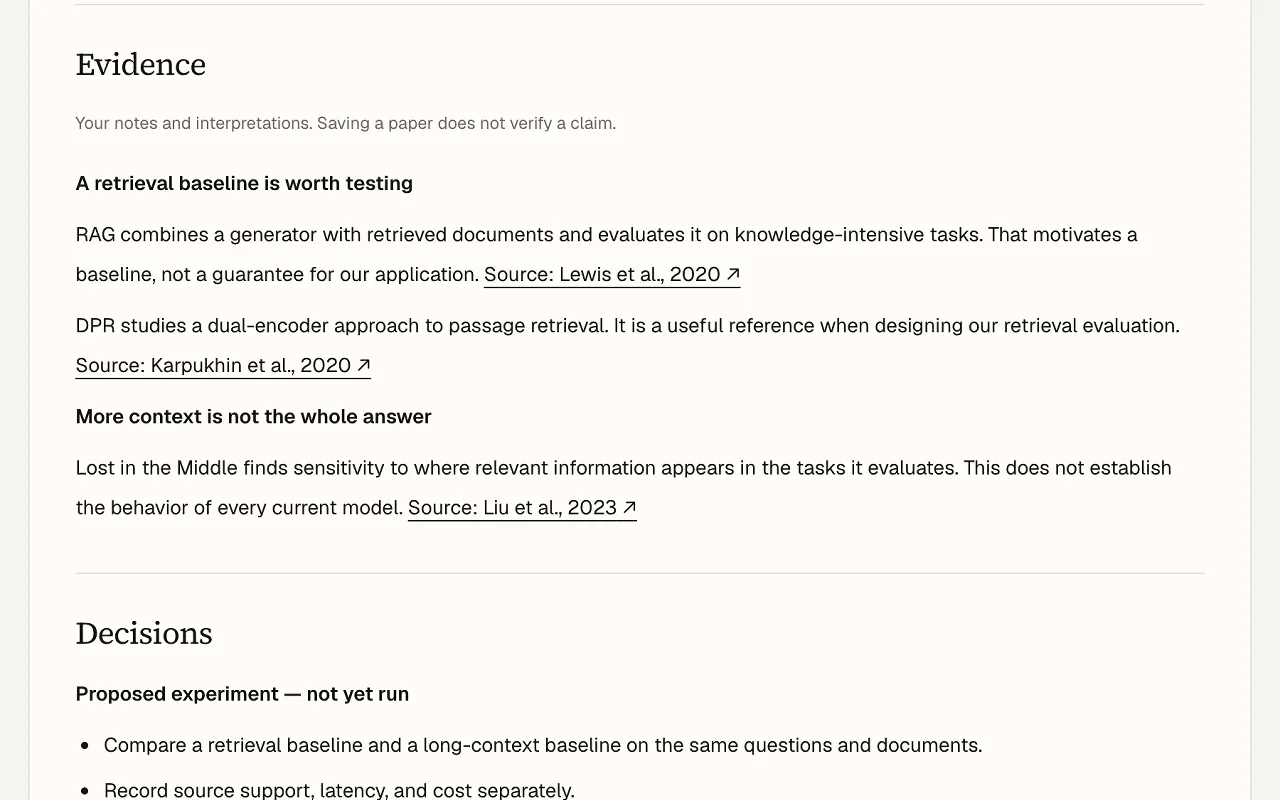
Lost in the Middle found that document position affected performance in its evaluated tasks. Test whether this holds for the model you plan to use.
Lost in the Middle · 2023 ↗Free
$0
Get from a question to your first comparison.
Academic
$10/mo
Pro at half price for eligible students and faculty.
Pro
$20/mo
For research that continues beyond the first answer.
Bringing a lab?
Talk to usAewolFlow is an AI research workspace for finding papers, reading original sources, comparing evidence, and drafting literature reviews. It keeps your papers, quotations, notes, and writing together so you can inspect the evidence and continue the work later.
Enter a research question at the top of this page, or open the public example without an account. For your free comparison, create a project, select 2–3 arXiv papers, approve the question and source set, and run the comparison. Read the supporting passages before using the findings.
The paper reader helps you study the original. MCP gives your assistant tools to find papers, check quotations and save work you can reopen in a later conversation.
One private project, one successful AI comparison of 2–3 arXiv papers, saved results and Markdown export. No card required. Further comparisons, other AI workflows and MCP require Pro: $20 a month, or $10 with verified academic eligibility.
Project comparisons use arXiv papers. Discovery also uses Semantic Scholar for related work. You can upload PDFs to the reader; uploaded PDFs are not currently inputs to the free project comparison.
No. Matching a quotation checks that the words appear in retrieved text. AI claim-support checks can still be wrong. Coverage varies by paper, so review the original source and its context before citing a result.
AewolFlow supports finding, comparing and writing about papers. It does not currently provide a complete PRISMA screening workflow, risk-of-bias assessment or meta-analysis.
You can reopen saved projects and comparison results, edit your brief and export Markdown on Free. Pro adds further AI work and more projects; it is not required to read your saved work.
On Pro: Claude, Claude Code, Codex, Cursor or any MCP client.
No. You can use AewolFlow in your browser with its included plan features. Connecting an external assistant through MCP is optional and requires Pro. Any subscription to that external AI provider is separate.
1 private project + 1 AI comparison of 2–3 arXiv papers. No card needed.